PACKAGE INFORMATION
Description
Advanced Crafting Tables brings dedicated weapon, attachment and item crafting stations to your FiveM server. Create and place stations through an administrator tablet, configure recipes and access rules, and give players separate XP and levels at each station. Compatible with ESX, QBCore and Qbox.
What you can do
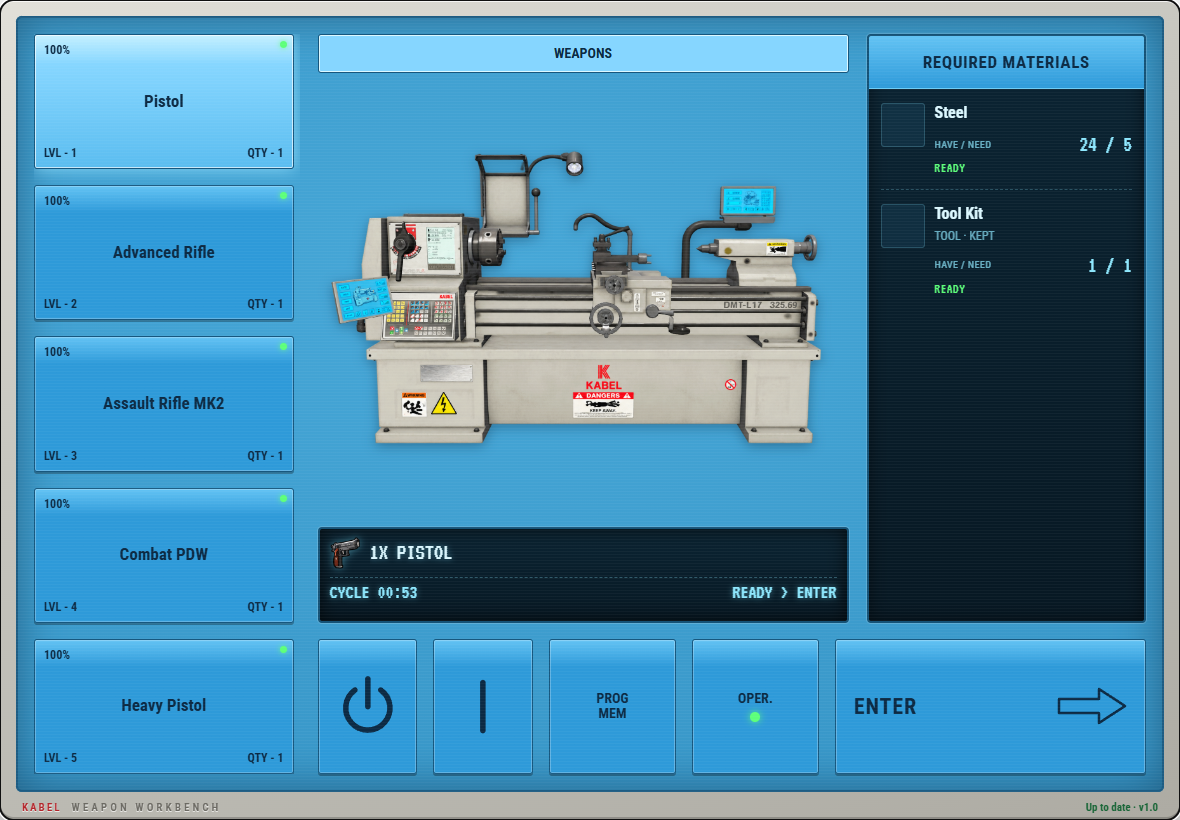
- Use three crafting stations: Craft weapons at the lathe, attachments at the milling machine and items at the workbench, with matching interfaces and work animations.
- Manage stations in game: Create, name, place and configure stations through the administrator tablet.
- Build your own recipes: Choose materials, kept tools, reward quantities, crafting durations, XP rewards and level requirements.
- Control station and recipe access: Keep stations public or restrict them to selected players, jobs and grades, or gangs. Individual recipes can have additional restrictions within the station’s access rules.
- Give each station its own progression: Players earn separate XP and levels at each station, unlocking recipes as they progress.
- Provide a personal station tablet: Let players check their progress, recipe unlocks, required materials, crafting guide and configured tutorial videos. Recipe lists include images, search and pagination.
- Configure weapon durability and repairs: Set starting durability for crafted weapons and enable repairs with configured material requirements.
- Enable multiple crafts: Choose sequential or batch crafting with configurable reward quantities.
- Choose your integrations: Select framework, inventory, target and notification providers. Built-in interaction and progress options are included.
- Extend the crafting flow: Use editable client and server hooks for permission checks, before-start actions, progress and completion. Read-only exports provide active crafting status.
Server-side checks validate station access, recipe access, proximity, level requirements, crafting time, materials and inventory capacity. Station settings, recipes and player progression are stored in the database. Editable locale files allow you to customize interface text.
Compatibility
Framework
| Resource | Status |
|---|---|
| ESX / es_extended | Supported |
| QBCore / qb-core | Supported |
| Qbox / qbx_core | Supported |
Use one supported framework.
Dependencies
| Resource | Status |
|---|---|
| oxmysql | Required — database storage |
| Supported framework | Required — choose ESX, QBCore or Qbox |
| Supported inventory | Required — choose an inventory below |
| ox_lib | Optional — needed when using its notification or progress provider |
Inventory
| Resource | Status |
|---|---|
| ox_inventory | Included adapter |
| qb-inventory | Included adapter |
| qs-inventory | Included adapter |
| ps-inventory | Included adapter |
| lj-inventory | Included adapter |
| ak47_inventory | Included adapter |
| Custom inventory | Editable adapter — developer setup required |
Inventory compatibility depends on the exports and metadata supported by your installed inventory version. Recipe materials and reward items must exist in your inventory.
Target / Interaction
| Resource | Status |
|---|---|
| Built-in interaction | Included — no external target resource required |
| ox_target | Supported — install its dependencies |
| qb-target | Supported — install its dependencies |
Notifications
| Resource | Status |
|---|---|
| Framework notifications | Included |
| fs_notify | Supported — optional |
| ox_lib notifications | Supported — optional |
Progress Bar
| Resource | Status |
|---|---|
| Built-in progress bar | Default — included |
| ox_lib | Supported — optional |
| QBCore progressbar | Supported — optional |
| Custom progress bar | Editable callbacks — developer setup required |
Logging
| Provider | Status |
|---|---|
| Discord | Included provider |
| FiveManage | Included provider |
| Custom logging | Editable provider — developer setup required |
Installation: Keep the resource folder named exactly fs_craftingtables. Start it after oxmysql, your framework, inventory and selected integrations. Database tables are created and migrated automatically on startup; the database account needs the required table creation and modification permissions. Open /fs_craftingtables and follow the permission instructions shown on the access page.
Preview: Video coming soon. Interface screenshots are available on the documentation preview page.
Support: Discord support is available from 9 AM to 10 PM Pakistan Standard Time (PKT, UTC+5).
Preview · Installation guide · Configuration · Troubleshooting · Discord support